Showing posts with label VU22358. Show all posts

Friday, May 28, 2021

Semester 1 2021 Learning Cycle


Term 1 : Online Learning

Week 1

Week 2

Learning Plan Assessment" Setting Goals
Week 3

VU22601 / VU22603 : Invitations
Week 4

VU22601.1 / VU22603.1: 
Asking a favour / Messages
Week 5

VU22601.1 / VU22603.1
Casual Convos / Informal Emails
Orientation
Week


Workbooks and Assessment Booklets 

MONDAY CLASS  Check your Gmail for Dale's invitation for you to edit. Click the OPEN IN DOCS button ... and start your work!


You received these workbook and assessment booklets in Google Docs / Type straight into the document / Complete the tables / No need to save or send to me / I will correct at the same time from my desk

Learning Circles and Mini-Classes

TUESDAYS AND WEDNESDAY AFTERNOONS
Learning Circles  (ZOOM) / Mini Classes (WhatsApp or ZOOM)


Small groups of students working together on projects. Some of you will work together in ZOOM with a group leader and a visit by me. Others will work with me in ZOOM or on WhatsApp in groups of no more than 3 students. Others will work with me 1-to-1. 

ZOOM Classes  

We have a ZOOM class for the whole class on Wednesdays 10.30 am - 12 noon. On Wednesday afternoons you will also be working together in groups often using ZOOM. 

Check for the ZOOM link in your Gmail / WhatsApp / Text. Just click the link ... you can arrive early for a chat or stay on for a chat afterwards.
Gmail / WhatsApp / Text / Phone

You need to check-in to class each day at 9 am. You can do this by Gmail, WhatsApp or Text.  I will send you the links to Monday's workbook through these media. You also need to check your media each day after lunch for further work and communication by me. You also need to be available by mobile and be willing to work with other students by phone, WhatsApp audio and video, Gmail and in ZOOM classes

Week 6

VU22601.1 :
Simple Conversations (Assess)
Week 7

VU22603.1
Written Communications (Assess)
Week 8

Reader:
The Adventures of Tom Sawyer

Week 9

VU22601.2
Repairs around the house
Week 10

VU22606.3 
Send and receive email
(Assess)

Term 2 : Blended Learning


Bring your mobile phone so you can scan the QR codes in the workbook. These QR codes will take you to all the audio, video and other docs you will need in class and at home.
This term we are returning to the face-to-face classroom once a week on Mondays. It will be fun working together - physically!

We will continue online Learning Circles and Mini-Classes on Tuesdays and Wednesday afternoon, ZOOM classes on Wednesday mornings.

I will continue to send you a workbook on Mondays through Gmail but this workbook will be in PDF with links. I will also give you a print copy of the workbook each week on Monday.

Also bring your study device if you can (laptop, tablet, phone). Make sure you charge them up before arriving on Monday morning.

If there is a lock down, we will return to online study until it is safe to return face to face.

Week 1Week 2Week 3Week 4Week 5
VU22601.2 : Transactions  Returning Goods / VU22358 - Learning Plan


VU22601 / VU22603 - Complaints / VU22606 - Develop Online Learning


VU22601.2 : Transactions
(Assess)


VU22603.3/.4 : Forms, Enquiries, Travel


Reader :Wk 1 - 5

The Black Cat - John Milne


Week 6

VU22606.3: Apps and Internet Safety
Week 7

VU22606.3: Online Shopping
Week 8

VU22603.3/.4 Forms  (Assess)
Week 9

VU22606.3: Internet (Assess)

Week 10

Reader :Wk 5 - 10 Walkabout - James Vance Marshall


VU22358 - Review Learning (Assess) 


Monday, March 29, 2021

Wk 10 T1 2021 Assess Bklt 4 : VU22606.3 / VU22358 : Term 1 Review


THIS WEEK ...

WCEC STUDENTS ONLY
                     
Monday

ZOOM CLASS 1 (everybody)

10.30 pm to 12 noon


MONDAY CLASS  check your Gmail for Dale's invitation for you to edit.

Click the 
OPEN IN DOCS button ... and start your work!


You received this assessment booklet in Google Docs / Type straight into the Workbook / Complete the tables / No need to save or send to me / I will correct at the same time from my desk /

  
You may also need to work with a partner on the workbook so be ready to ring each other!


MONDAY MORNING

Prepare for the Assessment

Let's look at the assessment together so you understand what you have to do

ZOOM CLASS 1   10.30 - 12 noon


PROBLEMS WITH GOOGLE DOCS? 


Are you having problems with Google Docs? Do you want to download a PDF instead? 

SPEAK TO ME ABOUT THIS

(WCEC students only)

Note: You will need to print out the workbook (on your own printer or go to Office Works for printing)

Complete the workbook, take photos of the Activity pages and send to me by email or by text


TUESDAY 


Learning Circles

1.30 pm - 3.30 pm


Small groups of 4-5 students 
working together on
projects
Today we will divide into 4 groups and you will all start and finish at the same time.

I will send you the ZOOM link for your Learning Circle

Follow the instructions of your Learning Circle leader


Look at :

Jane's Visit to China (adjectives and adverbs)

Tom Sawyer (Chapters 7 - 12)

Practice Sharing the screen in ZOOM


You have everything you need in Google Docs (Jane's Visit to China) and your Google Drive (Tom Sawyer Reader)
       WEDNESDAY 

ZOOM CLASS 2 (everybody)

10.30 am to 12 pm


WEDNESDAY ZOOM (10.30 am - 12 pm)

Check your Gmail for the Zoom invitation


Morning


Zoom Class (everyone) 10.30-12 noon


VU22358 : Let's Review Term 1

I will send you an exercise through Google Docs. 

1) Find all of your results for the term

2) Complete the questions

3) We will discuss how the term went for you!

Reading : Tom Sawyer (Chapt 13)

Let's read the last chapter together ..such a great book!


BREAK UP + Info about Term 2


 Maximised for viewing on a mobile device

Monday, January 25, 2021

Wk2 T1 2021 Assessment Booklet 1 : Develop a Learning Plan


THIS WEEK ...
WCEC STUDENTS ONLY
                     

MONDAY

ZOOM CLASS 1 (everybody)

1 pm to 2.30 pm

MONDAY CLASS  check your Gmail for Dale's invitation for you to edit.

Click the 
OPEN IN DOCS button ... and start your work!


You received this workbook in Google Docs / Type straight into the Workbook / Complete the tables / No need to save or send to me / I will correct at the same time from my desk /

  
You may also need to work with a partner on the workbook so be ready to ring each other!

MONDAY MORNING

Assessment Booklet Task 1 (Q.1 - Q.10)

This is not really a "test" but some questions to get us thinking about learning. We will look at the book together in ZOOM this afternoon. No need to worry :-)

MONDAY AFTERNOON

ZOOM CLASS 1    1 pm to 2.30 pm


PROBLEMS WITH GOOGLE DOCS? 


Are you having problems with Google Docs? Do you want to download a PDF instead? 

DOWNLOAD PDF HERE (PDF)

(WCEC students only)

Note: You will need to print out the workbook (on your own printer or go to Office Works for printing)

Complete the workbook, take photos of the Activity pages and send to me by email or by text


TUESDAY

Time for a catch up!


Learning Circles Day 1

1.30 pm - 3.30 pm


Small groups of 4-5 students 
working together on
projects


TUESDAY CLASS - Check Gmail

Morning

Workbook - Activity 2 / Activity 3

I will also be catching up with some of you by phone


Afternoon


Extra Activities (check your Gmail)


Learning Circles 1 (1.30 - 2.30 pm)

Learning Circles 2 (2.30 - 3.30 pm)


       WEDNESDAY 

ZOOM CLASS 2 (everybody)

10.30 am to 12 pm


Learning Circles Day 2

1.30 pm - 3.30 pm


Small groups of 4-5 students 
working together on
projects


WEDNESDAY ZOOM (10.30 am - 12 pm)

Check your Gmail for the Zoom invitation


Morning


Zoom Class (everyone)


Afternoon and homework

Check your Gmail for Extra Activities and homework after lunch


Learning Circle 3 (1.30 - 2.30 pm)

Learning Circle 4     (2.30 - 3.30 pm)

 Maximized for viewing on a mobile device

Sunday, June 14, 2020

Week 10, Term 2 —- Reviewing our Learning Plans


This week we will be doing our usual Learning Plan Review for Term 2 using Google Docs.

>>Click here to start << (WCEC Students only)
.
Spend Monday completing the Review. We will continue to use Google Docs. so you can type your answers directly and send a copy back to me. On Monday I will also send you a time to meet with me in my Video Room on Tuesday or Wednesday. We can also talk by phone to go through your answers together on those days if you prefer.


REMEMBER TO VISIT ME !
MESSENGER VIDEO ROOM 
(Open all day Mondays, Tuesdays and Wednesdays)

DROP IN ANYTIME TO ASK YOUR TEACHER QUESTIONS, GET HELP OR  JUST TO HAVE A CHAT 

Each week I will send you a video room link by email. Just click the link, add your name and press the button JOIN AS A GUEST ...you will then be in my Video ClassRoom. You do not need any special app or program.

***

Wyndham Community Education Centre Students ...


Please check in with me on MONDAY, TUESDAY and WEDNESDAY (9am -10am) by SMS OR EMAIL ...

I will only mark you present on the roll if you have checked in,

On Monday morning I will send you a time for a personal 30 min "mini-lesson" by phone or email but only if you have checked in,

 If you do not check in and I cannot contact you on Monday, you will be marked absent.

Monday, May 4, 2020

Week 4, Term 2 ---- Student Workbook #4

 Click here to download the Week 4 Term 2 Workbook
***
NEWS  !!!  CERTIFICATE 2 in EAL CLASS

Please check in with me on MONDAY, TUESDAY and WEDNESDAY (9am -10am) by SMS OR EMAIL  ...I will then mark you present on the roll. 

On Monday, and only when you have checked in, I will send you a time for a personal "mini-lesson" by phone or email. If I cannot contact you for your mini-lesson (and you do not contact me by mobile to arrange another time) I will mark you 'absent' on the roll.

Important: Check your gmail each morning on Monday, Tuesday and Wednesday for more news and activities!


***


PART 1 - WEEKLY WORKBOOK & AUDIO


>> Download Week 4 Workbook <<  (Dale's WCEC students only)

>>Download Week 4 Audio - Apps << (Dale's WCEC students only)

***

PART 2 - WORKBOOK REVIEW & CORRECTION VIDEO


PART 3 - WORKBOOK QUIZ 


***

Sunday, April 26, 2020

Week 3, Term 2 --- Student Workbook #3

 Download the Week 3 Student Workbook


NEWS  !!!  CERTIFICATE 2 in EAL CLASS

It is Week 3 and we are still studying online ...are you having fun? I miss you all. Keep sending your fabulous homework!

Please check in with me on MONDAY, TUESDAY and WEDNESDAY (9am -10am) by SMS OR EMAIL  ...I will then mark you present on the roll. 

On Monday only when you have checked in, I will send you a time for a personal "mini-lesson" by phone or email.

Important: Check your gmail each morning on Monday, Tuesday and Wednesday for more news and activities!


PART 1 - WEEKLY WORKBOOK & AUDIO


NEW! Download Week 3 Term 2 Workbook here (Dale's WCEC Students Only)


NEW! 
Download Week 3 Audio - Going to the Dentist in the Time of COVID-19 here  (Dale's WCEC Students Only)


PART 2 - WORKBOOK REVIEW & CORRECTION VIDEO


PART 3 - WORKBOOK QUIZ 


***

Thursday, April 16, 2020

Week 2, Term 2 --- Student Workbook #2


NEWS  !!!  CERTIFICATE 2 in EAL CLASS


With the Coronavirus crisis we are studying in Term 2 away from the classroom.

Please check in with me on MONDAY, TUESDAY and WEDNESDAY (9am -10am) by SMS OR EMAIL  ...I will then mark you present on the roll. 

I will send you a time for a personal "mini-lesson" by phone.  Let's catch up, talk about the work and prepare you for the coming week!


PART 1 - WEEKLY WORKBOOK & AUDIO


NEW! Download >>STUDENT WORKBOOK 2 WEEK 2, TERM 2 << (WCEC Students Only)


NEW!
Download >> AUDIO FILE WEEK 2 TERM 2 - APPOINTMENT WITH A VET << (WCEC Students Only)


PART 2 - WORKBOOK REVIEW & CORRECTION VIDEO


After you have downloaded the Workbook and started the exercises, come back here and watch the video. In this video Dale reviews some exercises to help you along the way!


PART 3 - WORKBOOK VIDEO QUIZ


Last of all, complete this quiz about the Workbook Video and submit to me

***

Monday, March 9, 2020

Week 5 and 6 Term 1 --- Skills for Self Study --- Homework and Review

***

VU22358 - Develop Learning Skills : Downloading


Last week we created a google account for the first time. 

This week you will see how we can use this account in different ways for study - for email communication and for downloading.


Instructions

Click on the DOWNLOAD links below.

(Don't worry ...We will do Exercise 1 together in the Computer Lab)

Where does the file go when you click on the link?
Can you find the folder where the file goes?
Can you open the file?
Can you print it?

How could you return the completed exercise to your teacher?

Exercise 1

DOWNLOAD THIS EXERCISE (Public)


***

VU22601 - LISTENING : Ordering in a restaurant

This week when you FINISH! the worksheet, I would like you to 'Email your answers to your teacher' ...you will have to add my email address when you have completed the exercise


dialogue, an interactive worksheet by farfour
liveworksheets.com


***

VU22601 - Video Comprehension - At the Airport

This week when you FINISH! the worksheet, I would like you to 'Email your answers to your teacher' ...you will have to add my email address when you have completed the exercise


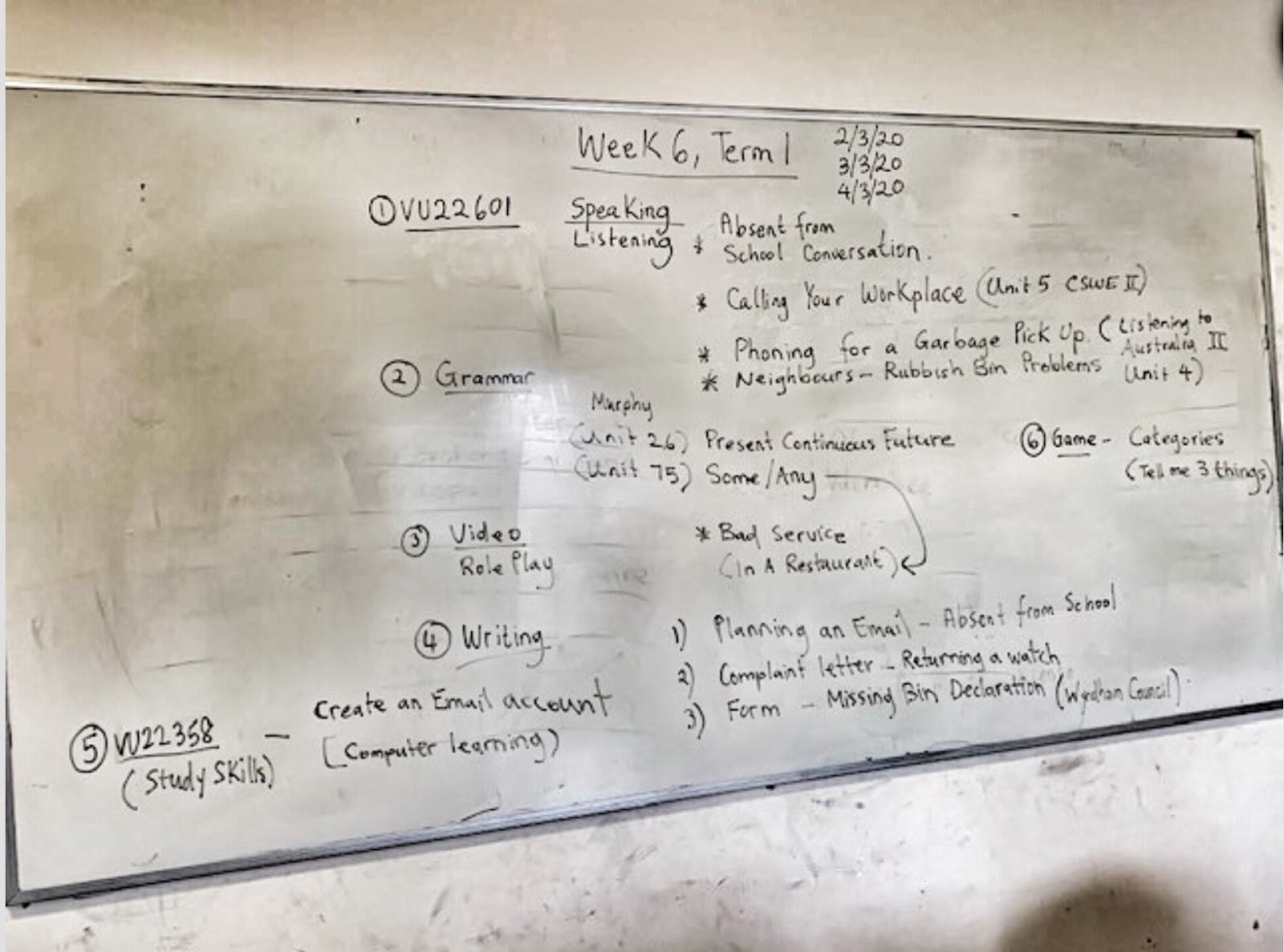
VU22358 - LEARNING DIARY (WEEK 5 and 6 WHITEBOARDS)

If you were away ...


Friday, January 31, 2020

Week 1 and 2 Term 1 --- Welcome! --- Homework and Review

(VU22606) - Access Internet and Email to Develop Language / VU22601 - Participate in short conversations and transactions / VU22358 - Develop Learning Goals)

HOMEWORK using a device  :  Click / Print / Complete

1. Click on the link and read the story, "Ünhealthy Breakfast"                          (ESL.Civics)
2. Print out the story at school or at home
3. Complete the exercises
4. Bring the worksheet to class on Monday (3 Feb) for review

***

CLASSWORK using a device

VU22601 - Introductions, Casual Conversations and Invitations

Let's learn about introductions (and spelling names)

Watch these people introducing themselves ...


When you meet someone for the first time what questions are OK to ask?
What things are OK to talk about? Which things are not OK to talk about?

Classwork Activity 1 : Read / Discuss

A.

Decide if these questions and comments are POLITE (OK) ✓or IMPOLITE ✘(not OK) when you talk to someone for the first time ...

  • What do you do for a living?
  • Why don't you have any children?
  • Tell me a little about yourself
  • Whereabouts do you live?
  • What's your street and house number?
  • How old are you?
  • Have you visited any other countries?
  • Do you play or follow any sports?
  • You're really good looking, you know.
  • How long have you been in Australia?
  • What shocking weather we're having!
  • How much do you weigh?
B.  Click and Print ...

... this worksheet for you and your partner to complete

Classwork Activity 2 :  VU22601 : Listening / Speaking : Invitations

In preparation for the first Assessment Task in Week 3, here are some conversations by students from past Level 2 classes

Let's see if they include ...

1) A Greeting
2) An Opening
3) Good turn taking
4) Clear communication
5) Confirmation of time, day, date
6) Use of 1 or 2 common expressions
7) Good pronunciation
8) Closing of the conversation

Remember : There are no hard rules for a casual conversation


1. Invitation to a Wedding  (Speakers : CS and ND) - MP3 (45 secs)

2. Invitation to a Party (Speakers : JP and HH) - MP3 (50 secs)

3. Invitation to a BBQ Speakers : GZ and DP) - MP3 (1m 06 secs)

4. Invitation to a Party (2) (Speakers : SP and TS) - MP3 (33 secs)

You be the judge! Listen to the conversations ...


Classroom Activity Exercise (Click and Print) ...this worksheet and give the conversations a score


GRAMMAR REVIEW

Watch and discuss ...


This week we looked at OPEN QUESTIONS vs. TAG QUESTIONS. Do you know how and when to use them?


Now try this interactive worksheet  ..


Tag questions, an interactive worksheet by Kharina
liveworksheets.com


Present Simple

We also reviewed the Present Tense so we know how and when to use Do / Does / Don't / Doesn't when we make questions (as well as negative and short answers)


Now try this interactive worksheet ...
Present Simple Tense, an interactive worksheet by jecika
liveworksheets.com


IF YOU WERE AWAY !!! 

VU22358 - Learning Diary ...what we learnt this week ... and blackboards from Week 1


You can also download and print this week's blackboards for your learning diary here (PDF)

MOVIE OF THE WEEK ...


Lucky Penny - Silent Short Film from Eugene Hattingh on Vimeo.


***

REVIEW (Listening) - Telling the time ...

1) Click on the clock to hear the time 2) Is it right or is it wrong?